TechMasti
For Cool Tricks & Tech Update


  • While the recently released Opera 9.5 had gained a lot of popularity, hacks start appearing on net. One of the cool feature of Opera 9.5 is Speed Dials. By default its value is set to 9 (3 columns & 3 rows). You can increase this number by following the below trick.


    • Set atleast one speed dial before following further steps.
    • Type about:opera in address bar.
    • Locate ‘Preferences folder’
    • Close the Opera (very important).
    • Now go to that (Preference) folder & open speeddial.ini
    • Add the below lines to the top:
    [Size]
  • Rows=3
  • Columns=5

Save & close speeddial.ini Done! Open Opera 9.5 & enjoy!
Note: You can adjust the number of rows & columns to fit your screen size.


HTC Launch P3350 in India

Posted In: . By MANI


HTC has launched its P3350 in India which has some very good business features as well as music capabilities. It has a 2MP camera and a 2.8 inch QVGA display.
As far as its music capabilities are concerned, it features an in-built FM Radio and is capable of downloading music and other audio/video contents. The downloading is through WLAN access and hence is quite fast enough. Apart from WLAN, it as other connectivity options like quadband, GPRS, EDGE and Bluetooth v 2.0 and the phone runs on Windows Mobile 6. Not only has it got some great features, the design is also quite stylish. It has a 360 degree scroll wheel and a 8 way touch pointer.
It runs some great collection of software’s such as Microsoft Office programs like Word Mobile, Outlook Mobile, Excel Mobile, IE Mobile, Windows Media player 10 mobile. It is available in India at a price of Rs 18,490.


While Firefox 3 is around the corner, Opera recently released 9.5 version. Having a habit of playing with all new software’s, I downloaded Opera 9.5 and felt that this browser just can’t be ignored. If you are anti-plug-in person then this browser is the perfect match for you as it has got loads of features inbuilt with the beautiful black design.
FIRST RUN: The browser was amazingly fast & stable, even on Windows Vista (I tested on Genuine Windows Vista Home Premium). I actually enjoyed my first browsing session on it. I visited my routine sites, all things went good.

But when I opened Gmail, it didn’t load chat in it. Also the progress bar of Gmail was not seen here as the Gmail detects the browser first and then accordingly loads the proper version. For opera it loaded the default without chat. I tried to load the default version of Gmail with chat by doing some tricks. This time it showed the loading progress bar but chat panel wasn’t loaded. After using it for sometime, chat panel appeared & was working properly. Its not opera fault but the Gmail chat version is still not developed by Google.

FEATURES: The feature which I loved was the text-to-speech engine of Opera 9.5. It has to be enabled from the Preferences menu, then it downloads a file of around 10.5mb. After that’s done just select any sentence, right click it & select ‘Speak’. You can now listen the text you selected. Cool! Isn’t it? Not only this, it offer two voice - one of male & another of female. I was more comfortable with the Male’s voice.
The display was quite clear & font looked better than that of Firefox 2. It also has the functionality to remember the passwords & set a master password. Right clicking anywhere on page showed up many handy options.

Hovering over the tabs, resulted in preview of those tabs which made life easy. The other feature that inspired me was the auto complete of URL’s which worked at lightning speeds. It has ability to auto-complete URL’s as you type from the history.
Also when new tabs are opened, a Speed Dial window open in it. You can specify up to 9 speed dials of your wish. This tool really proved handy.

I will just say don’t miss out this browser. Opera really worked hard to beat the Firefox 3 and this black beauty is capable of biting the market of Firefox 3.

Download Opera 9.5


Gmail is a very powerful app from Google. It uses over hundreds of scripts to get itself going. The features offered by Gmail are just amazing and are not offered by any other online mail client. But these good features also takes some good time to load. For those people who can’t wait for this loading of Gmail scripts can opt out for the below solutions.
1. Don’t allow Gmail to detect your browser: Gmail checks your browser & its version. Disabling this speeds up the loading time of Gmail. You can disable this with the link below.
http://mail.google.com/gmail?nocheckbrowser
2. Load the basic HTML version of Gmail: You can load the basic version of Gmail by following the link below. This is the best method of speeding up Gmail but it lacks many cool features from the default version.
http://mail.google.com/mail/h
3. Load the mobile version of Gmail: This methods gets handy when you are in a hurry of reading a mail instantly. The other goodness of this trick is its without ads. Use the below link to access the mobile version of Gmail.
http://m.gmail.com/
If you can’t follow the above three methods & cannot compromise the features like chat, then change the below settings in your account.
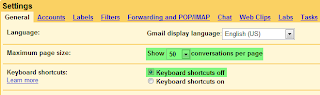
4. Disable basic settings: You must disable some basic settings of Gmail, if you find that Gmail takes a lo time to load. just click on settings & then change the following settings: (Click on images to enlarge)Gmail by default loads 50 messages in the Inbox. You can change this setting to load few at a time.

You can also turn off Keyboard Shortcuts as it will stop Gmail from continuously monitoring your keyboard strokes. Turn off the indicators.Turn off all the labs features.


Some leaked information about the new Sony Ericsson Cybershot phone is going around.From the information going around, we know that it is called the Sony Ericsson C905 Cybershot codename Shiho and it has got a 8 MP camera. It even has Auto Focus, image stabilization, face detection as well as a Xenon and Photoflash and has a new feature called Smart Contrast. It also has a built in GPS with Geotagging feature. Some of its other features are a TV out port, an accelerometer for auto screen rotation, WiFi as well as external memory support. The WiFi feature supports DLNA (Digital Living Network Alliance), a protocol that runs on top of WiFi and enhances the sharing of various media. It will have a 2.4-inch scratch-resistant TFT display made of mineral glass and will have a pixel resolution of 240 x 320 (QVGA) with 262K colors.Although nothing is official yet, but if it becomes true, then it sure is a great phone but its price might be expensive.


Samsung has today unveiled its i-killer known as i900 Omnia. It is a Windows Mobile Handset and it is expected to challenge the 3G iPhone. It also has a 3.2 inch QVGA display sporting a 240X400 pixel resolution and also comes equipped with a small optical mouse.
It has a 5 MP auto-focus camera with face and smile detection along with auto-panorama shot. It also has a Geotagging feature which works with the inbuilt GPS. It also has a quad-band GSM/GPRS/EDGE support plus HSDPA 7.2Mbps. It also comes with Wi-Fi support, USB port, FM radio and stereo Bluetooth. Samsung has also incorporated their TouchWiz interface into this handset which seems like a good enhancement.
It is just 12.5 mm thick and looks quite stylish. Similar to the iPhone, it will come in 8GB and 16GB capacities with microSD also present. It will be launched near the end of June 2008 and it might coincide with the projected launch of 3G iPhone. It even looks a lot like iPhone so Apple better watch out.


The development of Web applications for social sites such as Facebook, Orkut etc are becoming very popular. But normal users don’t have enough knowledge and time to actually make one. This is where Zembly comes in. Zembly is a host and creation engine of social applications that will facilitate in the development of apps for use in a number of devices and platforms such as Facebook, Meebo, Youtube, iPhone or gadgets that may be embedded.
Zembly is funded by Sun Microsystems. It has been launched as a private beta, and allows the users the option to create and modify code. It is helpful for the new user as it allows them to piece together new items from previous components rather than building from the scratch. Its main role is
The whole point of zembly is to reuse and combine not just what other people at Zembly create, but to rely on the APIs and data from anywhere on the Web
Currently it is available by invitation only. So it is time to think and develop something creative using this wonderful application.


Technologies,  Science

Science and Technology

SkinnyScore Widget Web 2.0 - Required. Cut and paste this HTML code on your blog.

Have your blog ranked and get more readers.

Live Cricket Scores

Chat Box


OFFER!!!!!!!

Website Magazine

SnapShots

Get Free Shots from Snap.com